


Oct 26, 2026
How to Use the Shopkeeper API
The Shopkeeper API gives you the numbers you see in Shopkeeper as JSON, so you or your developer can pull them into spreadsheets, BI tools or your own apps. It can only read your data.
To ask questions in an AI assistant instead, see How to Connect Your AI Assistant to Shopkeeper.
Create an API key
-
In Shopkeeper, open API & MCP in the menu.
-
In the Shopkeeper API card, type a name for the key, such as the tool it's for, and click Create key.
-
Copy the key. It starts with
shk_and is shown only once.
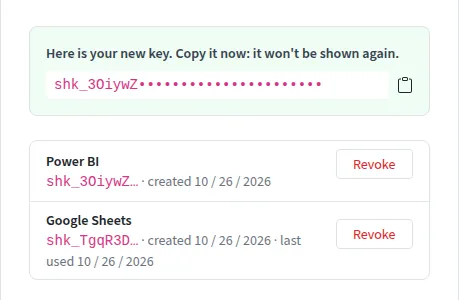
Keep the key secret: anyone who has it can read your Shopkeeper data. One key covers every store and marketplace you've connected. Make a separate key for each tool, so you can revoke one without breaking the others.
Make your first request
Send the key in the Authorization header:
curl -H "Authorization: Bearer YOUR_KEY" \
  "https://shopkeeper.com/api/v1/sales?from=2026-09-01&to=2026-09-30"
Every answer is JSON, in your account's currency unless you ask for another. The answer looks like this:
{
  "currency": "USD",
  "from": "2026-09-01",
  "to": "2026-09-30",
  "totals": {
    "unitsSold": 1240,
    "unitsRefunded": 31,
    "revenue": 32180.5,
    "refunds": -798.4,
    "adjustments": 112.6,
    "expenses": -9873.25,
    "costOfGoods": -8120,
    "advertising": -3410.75,
    "taxCollected": 0,
    "taxPayable": 0,
    "taxCollectedInRevenue": true,
    "profit": 10090.7,
    "margin": 0.3136,
    "roi": 1.2427
  },
  "dataThrough": {
    "orders": "2026-10-25",
    "settlements": "2026-10-23",
    "ads": "2026-10-24",
    "inventory": "2026-10-25"
  }
}
dataThrough tells you the last day Shopkeeper has orders, settlements, ad data and inventory for, so you know how fresh the numbers are.
What you can ask for
All addresses start with https://shopkeeper.com/api/v1.
| Endpoint | What it returns |
|---|---|
GET /sales |
Sales, refunds, costs and profit. Add groupBy=day, week or month to split them |
GET /profit |
The P&L, section by section. Takes groupBy too |
GET /products |
The same figures per product, best sellers first. limit sets how many (up to 500) |
GET /orders |
Orders with their profit, 50 a page. page picks the page |
GET /orders/ORDER_ID |
One order's P&L |
GET /inventory |
Stock, inbound units and days of stock per product, 50 a page |
GET /advertising |
Campaigns with spend, sales and ACoS. type=sp, sb, sbv, sba, sda, sdp or sdr |
GET /catalog |
Your products with their titles, ASINs, images and prices, 100 a page |
GET /product-costs |
The costs you entered per SKU and marketplace, 100 a page |
GET /expenses |
The manual expenses that apply between from and to |
GET /accounts |
Your connected Amazon accounts and stores |
GET /settings |
Your currency, time zones and sales and VAT settings |
Narrowing the answer
-
fromandto, asYYYY-MM-DD, are required for sales, profit, products, orders, advertising and expenses. Dates are days in your account's time zone. -
marketplaces=GB,DEkeeps only those marketplaces. -
skus=SKU1,SKU2keeps only those products. -
stores=amazon:A1B2C3keeps only those stores. Take the store ids from/accounts. -
currency=EURgives money in another currency.
Limits and errors
You can make up to 60 requests a minute, and two at the same time. Past that you get status 429: wait the number of seconds in the Retry-After header and try again.
Errors come back with a status and a message that says what went wrong:
{ "error": { "code": "bad_request", "message": "from must be a date as YYYY-MM-DD" } }
-
400: a parameter is missing or wrong. -
401: the key is missing, wrong or revoked. -
404: no such endpoint, or no order with that id. -
500: something went wrong on our side. The answer has areference; send it to support@shopkeeper.com.
Revoke a key
On the API & MCP page, click Revoke next to the key. Anything using it stops working straight away.
See your usage
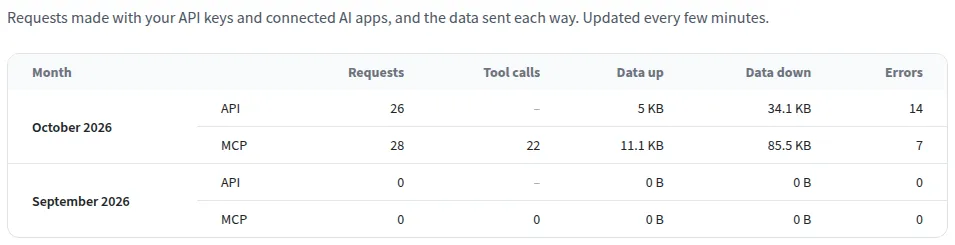
The See usage link on the API & MCP page shows, month by month, how many requests your keys and AI apps made, how much data went each way and how many failed.
The API is free during the beta.


